ASUS ROG Strix Scope II 96 Wireless vs Redragon K556

Value Shape Comparison
Tradeoffs at a glance
Connectivity
ASUS ROG Strix Scope II 96 Wireless leads by 36ASUS ROG Strix Scope II 96 Wireless scores 92; Redragon K556 scores 56
Build
ASUS ROG Strix Scope II 96 Wireless leads by 16ASUS ROG Strix Scope II 96 Wireless scores 86; Redragon K556 scores 70
Value
Redragon K556 leads by 14ASUS ROG Strix Scope II 96 Wireless scores 80; Redragon K556 scores 94
Gaming
ASUS ROG Strix Scope II 96 Wireless leads by 12ASUS ROG Strix Scope II 96 Wireless scores 84; Redragon K556 scores 72
Typing
ASUS ROG Strix Scope II 96 Wireless leads by 12ASUS ROG Strix Scope II 96 Wireless scores 86; Redragon K556 scores 74
ASUS ROG Strix Scope II 96 Wireless is stronger at: Gaming, Typing, Build, Connectivity
Redragon K556 is stronger at: Value
Stärken & Schwächen
ASUS ROG Strix Scope II 96 Wireless
Stärken
- Starke Gesamtbewertung von 4.4/5.
- Relevante Option innerhalb der Kategorie Gaming Keyboards.
- Lässt sich klar mit direkten Alternativen vergleichen.
Schwächen
- Der Endpreis kann je nach Händler und Verfügbarkeit schwanken.
- Vor dem Kauf lohnt sich der Vergleich mit mindestens einer Alternative.
Redragon K556
Stärken
- Starke Gesamtbewertung von 4.4/5.
- Relevante Option innerhalb der Kategorie Gaming Keyboards.
- Lässt sich klar mit direkten Alternativen vergleichen.
Schwächen
- Der Endpreis kann je nach Händler und Verfügbarkeit schwanken.
- Vor dem Kauf lohnt sich der Vergleich mit mindestens einer Alternative.
Daten
ASUS ROG Strix Scope II 96 Wireless
- Preis
- ~124,99 $ · Oct 31, 2026, 6:07 AM UTC
- Bewertung
- 4.4 / 5.0
- Wichtige Merkmale
- Bewertung von 4.4/5 in der Kategorie gaming keyboards.
- Referenzpreis von Preis prüfen für einen schnellen Wertvergleich.
- Im Katalog für direkte Vergleiche mit Alternativen derselben Kategorie enthalten.
- Katalogdaten aktualisiert am 9. Juli 2026.
- Layout
- 96% with numpad
- Switch Type
- ROG NX mechanical (hot-swap)
- Connectivity
- Bluetooth / 2.4GHz SpeedNova / USB-C wired
- Backlight
- Per-key RGB
- Best For
- Gamers who want wireless freedom with a numpad
- Height
- 1.57 Inches
- Width
- 5.16 Inches
- Length
- 14.84 inches
- Gewicht
- 2.78 Pounds
- Color
- Black
- Model Number
- X901 STRIX SCOPE II 96 WL/NXSW/CA/PBT
- Warranty
- 1 Year Warranty
- Keyboard Backlight
- Nicht angegeben
Redragon K556
- Preis
- Check price
- Bewertung
- 4.4 / 5.0
- Wichtige Merkmale
- Bewertung von 4.4/5 in der Kategorie gaming keyboards.
- Referenzpreis von Preis prüfen für einen schnellen Wertvergleich.
- Im Katalog für direkte Vergleiche mit Alternativen derselben Kategorie enthalten.
- Katalogdaten aktualisiert am 9. Juli 2026.
- Layout
- Full-size with numpad
- Switch Type
- Outemu brown mechanical (hot-swap)
- Connectivity
- USB wired
- Backlight
- Per-key RGB
- Best For
- Budget buyers who want a full-size mechanical gaming keyboard
- Height
- 1.59 inches
- Width
- 4.88 Inches
- Length
- 17.13 inches
- Gewicht
- 2.20 Pounds
- Color
- Black
- Model Number
- K556
- Warranty
- 1 year
- Keyboard Backlight
- Yes
| Merkmal | ASUS ROG Strix Scope II 96 Wireless | Redragon K556 |
|---|---|---|
| Preis | ~124,99 $ · Oct 31, 2026, 6:07 AM UTC | Check price |
| Bewertung | 4.4 / 5.0 | 4.4 / 5.0 |
| Wichtige Merkmale |
|
|
| Detaillierte technische Daten | ||
| Layout | 96% with numpad | Full-size with numpad |
| Switch Type | ROG NX mechanical (hot-swap) | Outemu brown mechanical (hot-swap) |
| Connectivity | Bluetooth / 2.4GHz SpeedNova / USB-C wired | USB wired |
| Backlight | Per-key RGB | Per-key RGB |
| Best For | Gamers who want wireless freedom with a numpad | Budget buyers who want a full-size mechanical gaming keyboard |
| Height | 1.57 Inches | 1.59 inches |
| Width | 5.16 Inches | 4.88 Inches |
| Length | 14.84 inches | 17.13 inches |
| Gewicht | 2.78 Pounds | 2.20 Pounds |
| Color | Black | Black |
| Model Number | X901 STRIX SCOPE II 96 WL/NXSW/CA/PBT | K556 |
| Warranty | 1 Year Warranty | 1 year |
| Keyboard Backlight | Nicht angegeben | Yes |
Empfehlungen
KurzfazitDie Wahl zwischen ASUS ROG Strix Scope II 96 Wireless und Redragon K556 hängt von Preis, Bewertung und passendem Einsatz in der Kategorie gaming keyboards ab.v
Wer sollte ASUS ROG Strix Scope II 96 Wireless kaufen?ASUS ROG Strix Scope II 96 Wireless passt zu Käufern, die eine starke Option in der Kategorie gaming keyboards suchen, ohne den gesamten Katalog selbst zu sortieren.v
Wer sollte Redragon K556 kaufen?Redragon K556 ist für Käufer interessant, die eine andere Mischung aus Wert, Bewertung und Funktionen bevorzugen.v
Alltag und WertIm Alltag ist die beste Wahl nicht automatisch die am höchsten bewertete.v
Häufige Fragen
Ist ASUS ROG Strix Scope II 96 Wireless besser als Redragon K556?v
Beide sind starke Optionen in der Kategorie Gaming Keyboards. Nach Bewertung liegt ASUS ROG Strix Scope II 96 Wireless mit 4.4/5 vorn, aber die bessere Wahl hängt von den Funktionen ab, die du wirklich nutzt.
Was ist günstiger, ASUS ROG Strix Scope II 96 Wireless oder Redragon K556?v
ASUS ROG Strix Scope II 96 Wireless ist aktuell die günstigere Option mit einem Referenzpreis von Preis prüfen, während Redragon K556 bei Preis prüfen liegt.
Wo kann ich ASUS ROG Strix Scope II 96 Wireless oder Redragon K556 kaufen?v
Nutze die Händlerbuttons auf dieser Seite, um Endpreis, Verfügbarkeit und Bedingungen vor dem Kauf zu prüfen.
Urteil
ASUS ROG Strix Scope II 96 Wireless
ASUS ROG Strix Scope II 96 Wireless ASUS ROG Strix Scope II 96 Wireless hat einen leichten Vorteil, aber die bessere Wahl hängt von Funktionen, Verfügbarkeit und Endpreis ab.
Preisvorteil
ASUS ROG Strix Scope II 96 Wireless: Preis prüfen
Bewertungssieger
ASUS ROG Strix Scope II 96 Wireless: 4.4 / 5.0
Kategorie-Fit
Gaming Keyboards
Knappes Budget? Nimm ASUS ROG Strix Scope II 96 Wireless und spare Preis prüfen. Willst du die am besten bewertete Option? ASUS ROG Strix Scope II 96 Wireless liegt vorn. Beide sind stark in der Kategorie Gaming Keyboards; entscheide nach den Merkmalen, die dir am wichtigsten sind.
Merchant comparison
Check current buying options
Prices only appear after an exact listing is verified. Search and availability links use compliant check-price CTAs.
2 products
ASUS ROG Strix Scope II 96 Wireless
~$124.99 · Amazon price as of Oct 31, 2026, 6:07 AM UTC · ★ 4.4 · Gaming Keyboards
Amazon-Preis- und Verfügbarkeitsdetails
Product prices and availability are accurate as of the date/time indicated and are subject to change. Any price and availability information displayed on Amazon.com at the time of purchase will apply to the purchase of this product.
Affiliate-Link: Wir können an qualifizierten Käufen verdienen.
Amazon-Preis- und Verfügbarkeitsdetails
Product prices and availability are accurate as of the date/time indicated and are subject to change. Any price and availability information displayed on Amazon.com at the time of purchase will apply to the purchase of this product.
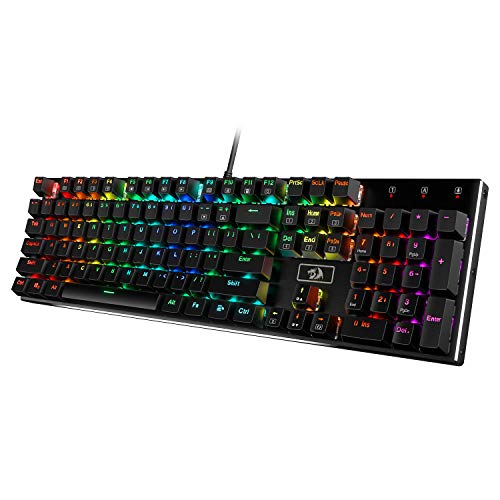
Redragon K556
Check price · ★ 4.4 · Gaming Keyboards
Affiliate-Link: Wir können an qualifizierten Käufen verdienen.
Amazon-Preis- und Verfügbarkeitsdetails
Product prices and availability are accurate as of the date/time indicated and are subject to change. Any price and availability information displayed on Amazon.com at the time of purchase will apply to the purchase of this product.
Das könnte dir auch gefallen
Weitere starke Optionen in der Kategorie Gaming Keyboards

Amazon-Preis- und Verfügbarkeitsdetails
Product prices and availability are accurate as of the date/time indicated and are subject to change. Any price and availability information displayed on Amazon.com at the time of purchase will apply to the purchase of this product.


Amazon-Preis- und Verfügbarkeitsdetails
Product prices and availability are accurate as of the date/time indicated and are subject to change. Any price and availability information displayed on Amazon.com at the time of purchase will apply to the purchase of this product.

More alternatives